
Upload once. The form fills itself
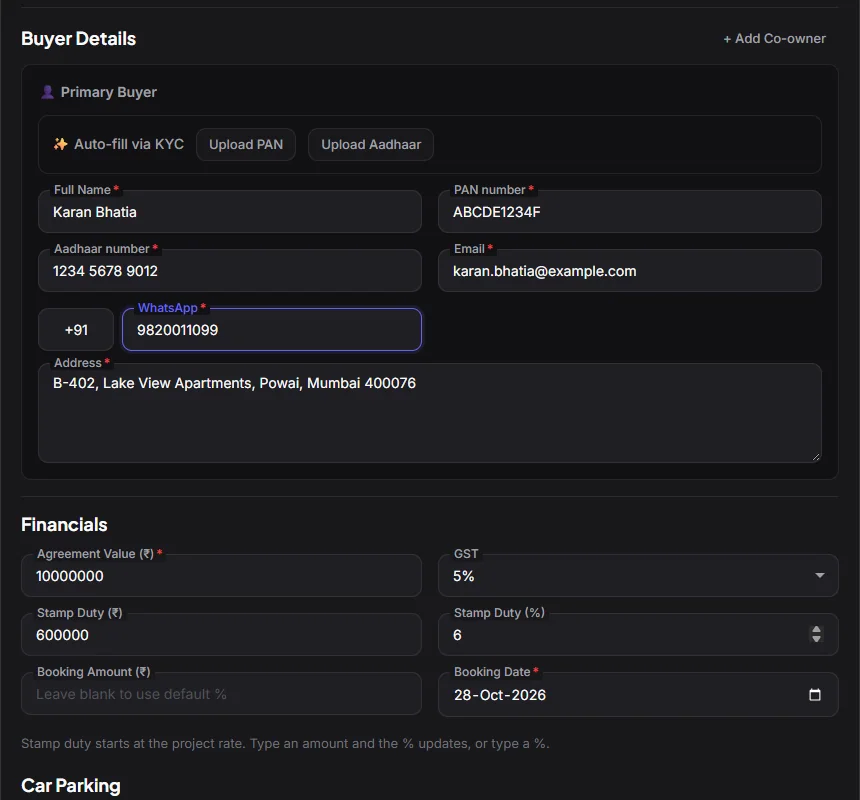
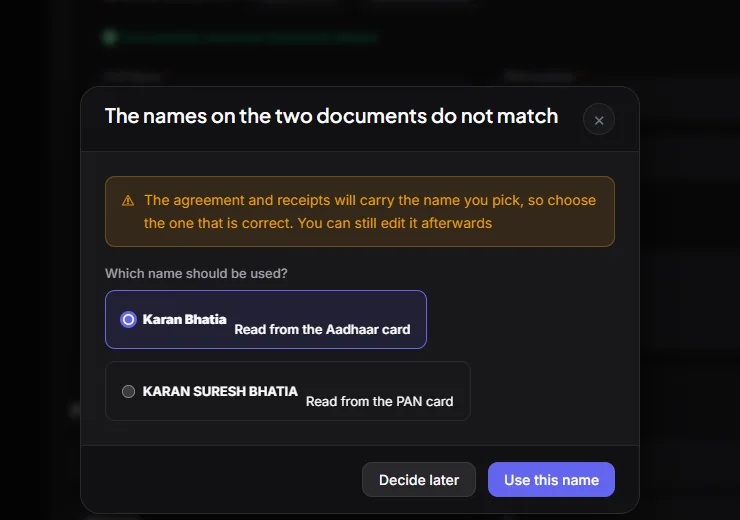
In Neev CMS you upload a buyer's PAN and Aadhaar, including password-protected e-Aadhaar PDFs, and the buyer details fill themselves. If the names on the two documents differ, the system asks which one to use. A person still verifies: this removes retyping, not judgment.
Is that PAN a zero or an O?
Updated 5 November 2026
How does the buyer form fill itself?
Upload the PAN and the Aadhaar, and the buyer details fill themselves.
- Reads the cards: PAN and Aadhaar, locked PDFs too.
- Flags name clashes: you pick which name to use.
- Nothing left blank: every buyer detail is required.
What happens when the names don't match?
A dialog shows the name read from each card and asks which one to use. The agreement and receipts will carry the name you pick, and you can still edit it afterwards.
Is anything approved automatically?
No. A person still verifies each buyer. Neev removes the retyping, not the judgment.
Questions about pan and aadhaar
More in the full FAQ.
Does it work with password-protected e-Aadhaar PDFs?
Yes. PAN and Aadhaar are read, including password-protected e-Aadhaar PDFs.
Who approves the buyer's details?
A person on your team. Neev fills the form and flags mismatches; it does not approve anyone.
Where are PAN and Aadhaar numbers stored?
Encrypted, on your own server or private cloud. After handover we keep no access.
Stop chasing. Start collecting.
A walkthrough of one of your own milestones, certificate to receipt.