
Every message on one timeline: never a debate
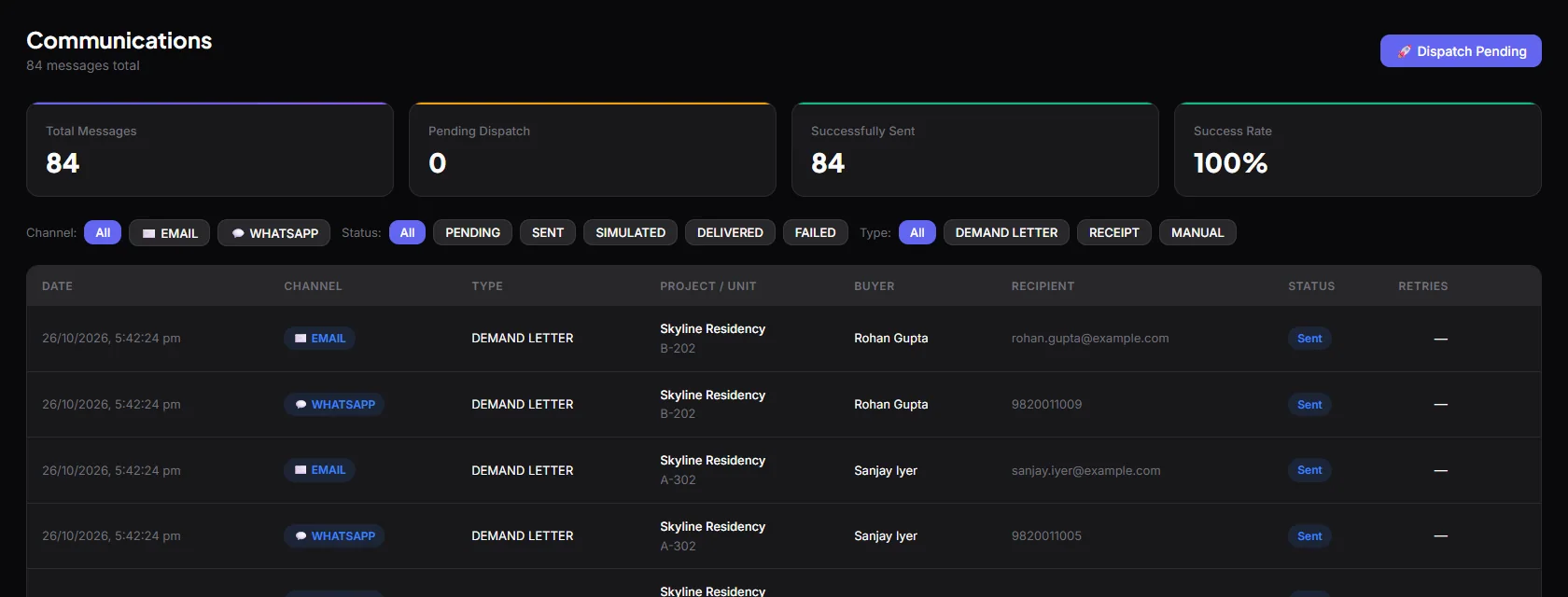
Neev CMS logs every demand and receipt it sends, by buyer and channel, with its status. When a dispute comes up, you can show exactly what went to which buyer and when. A failed send is retried in one click, and roles plus an audit log record who can see and change what.
Did we send that?
Updated 5 November 2026
Did we send that?
Every demand and receipt is in one log, with its status. When a dispute comes up, you can show exactly what went to which buyer and when.
- By buyer and channel: every demand and receipt, with its status.
- Retry in one click: failed sends never go missing, and email goes out independently.
Who can see what?
Roles are Super Admin, Admin, Sales and Viewer. Roles keep the sales team out of the financials and viewers read-only, and the audit log records every important change.
Questions about communications
More in the full FAQ.
What roles are there?
Super Admin, Admin, Sales and Viewer. Sales is kept out of the financials and Viewer is read-only.
What if a message fails to send?
Every message keeps its status. A failed send is retried in one click, and email goes out independently of WhatsApp.
Is there an audit log?
Yes. The audit log records every important change.
Stop chasing. Start collecting.
A walkthrough of one of your own milestones, certificate to receipt.